
Interactive video in Verbalu
A video survey that works like a conversation
You record short clips and join them into a tree. The recipient opens a link and answers, and the next clip depends on their choice. You see which way they went and what they said.
- No account or app for the recipient
- Free plan with no card
- Pro US$12 a month per organization
Walk through the conversation as the recipient and see what the author sees next to it
You, the recipient
Hi!
A few short questions, about 1 min.
This is an example without a recording: in a real conversation your video plays instead of this card.
What it is for
One tool, three kinds of conversation
For everything where an email is too little and a meeting is too much.
Before you meet
Sales and consulting
- Opening a client conversation before the first call: they pick what matters to them and get a clip about exactly that
- Answers to the questions clients ask most often: price, rollout, security, each in its own branch
- A short recap after a meeting with a question about what comes next
Before the room and after it
Training
- Learning participants' needs before a training
- Feedback after a training spoken aloud instead of typed into a form
- A step-by-step how-to with a separate branch for common mistakes, also as a course step
First days and new rules
HR and L&D
- Welcoming a new person to the team
- A new procedure explained by the person responsible for it, with a question after each step
- The team's voice after a change in the company: a few questions and an answer in their own words
How it reaches people
Paste it into an email and send it from your own inbox
You don't need another sending tool. From the session console you copy a ready snippet: the picture of the clip with a play button and the link to the conversation.
- A still or moving picture, made from the first 3 seconds of the clip
- A personal link greets people by name, and the report shows who went which way
- Paste a list of people or upload a CSV file, and the links are created for you
To: Anna Smith
Subject: Anna, one question before our call
Hi Anna,
I recorded a short video for you. You can answer with one tap.
Watch and reply
Marta
How it is made
From the goal of the conversation to the first answer
You build the tree yourself or with AI, and you record clips in the browser. There is nothing to install.
Build the tree
Write the goal of the conversation and AI suggests the steps, the text of each clip and the answer options. Or start from an empty canvas. A tree has up to 40 cards.
Record the clips
Camera and teleprompter in the browser, a phone through a QR code, or a ready MP4, WebM or MOV file. A clip runs up to 3 minutes.
Send it
Set the limit of people and take the link, the QR code or the ready email snippet. A list of people gets personal links.
Read the conversations
You get a notification after every conversation. The report has the path map, the answers, the voice recordings and a CSV export.
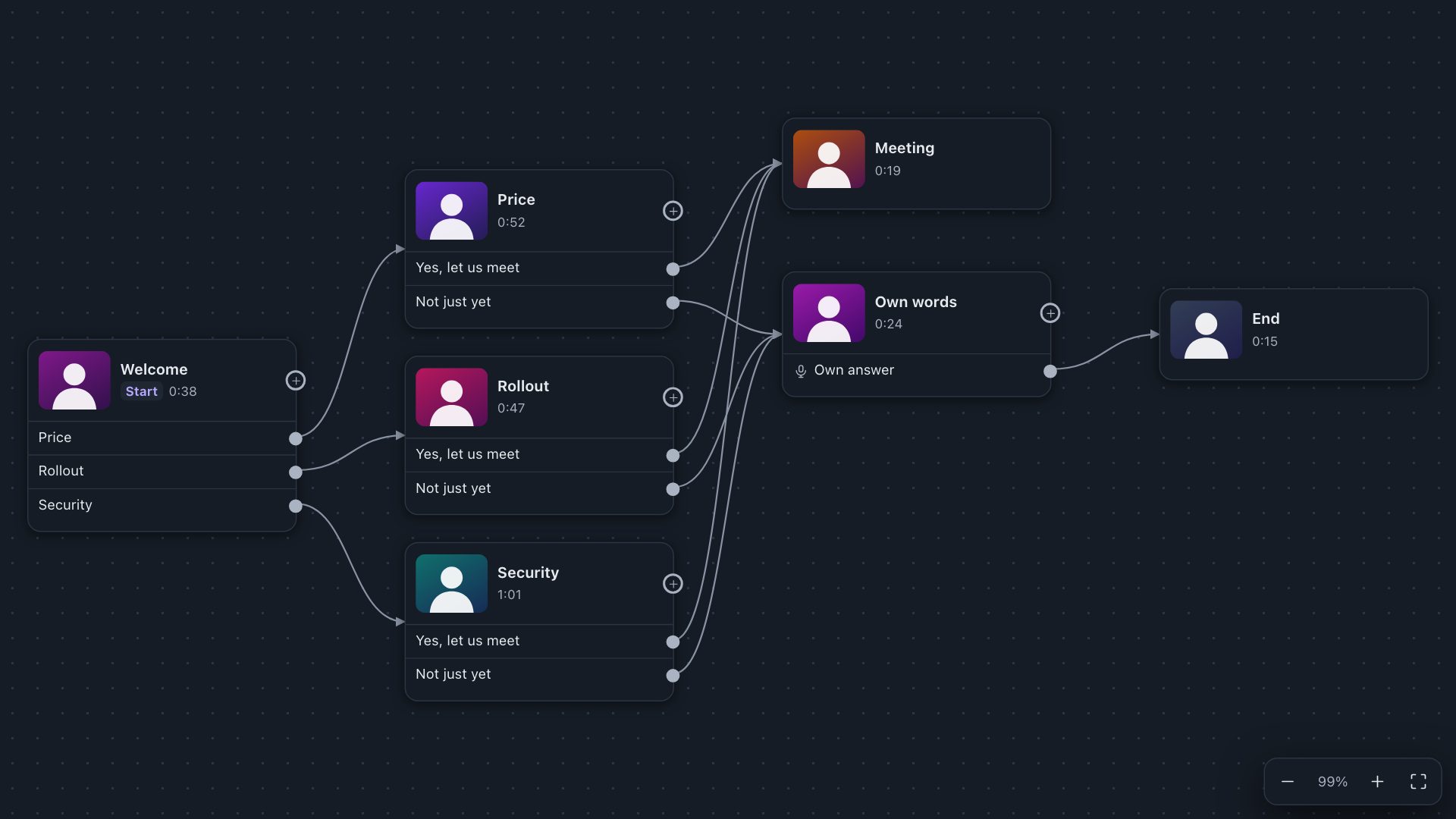
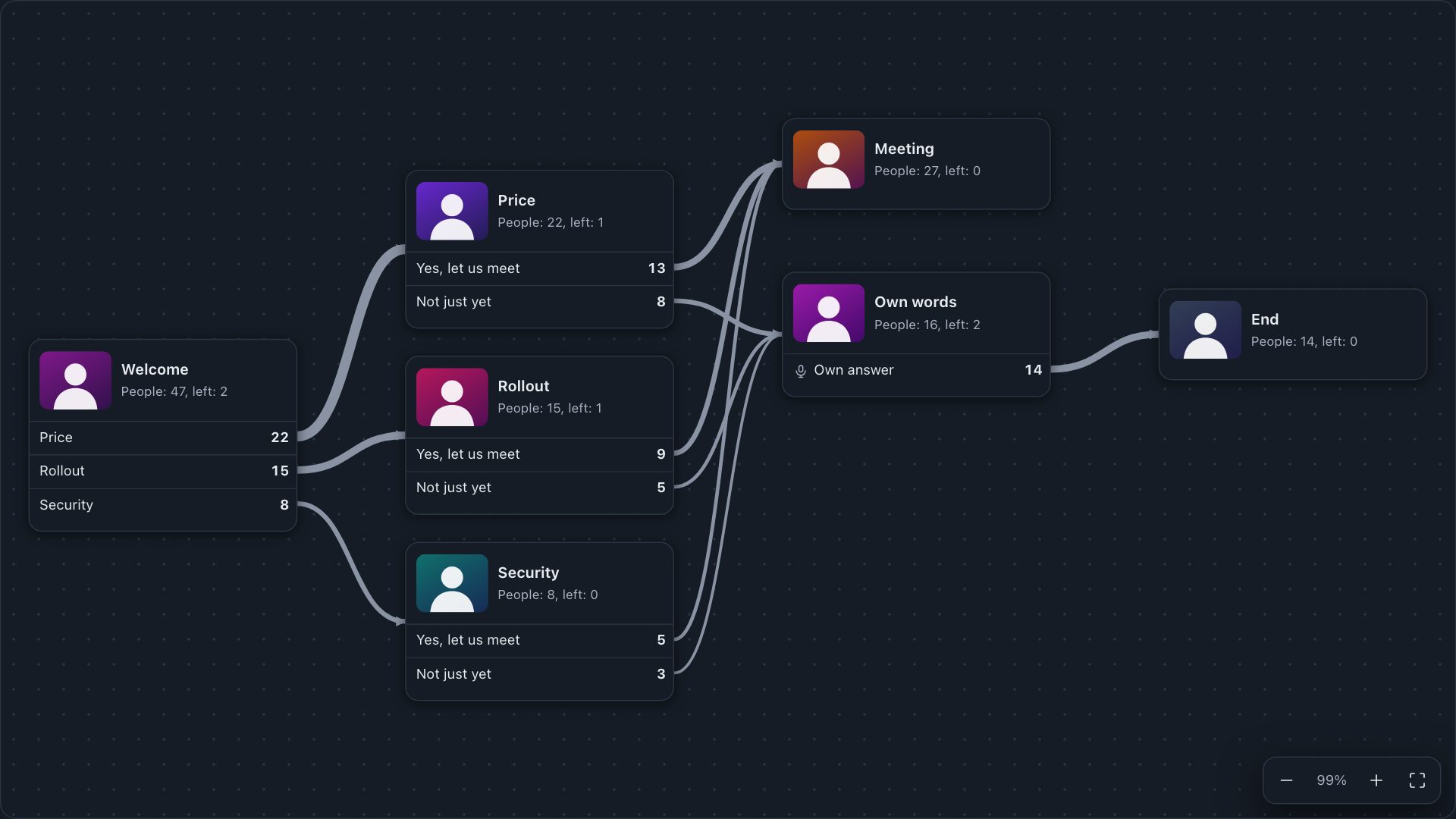
Real Video Survey screens with example data.
What you get
Everything a conversation on video needs
A canvas with no dead ends
You drag cards and lines, and a conversation with a hanging branch or a loop cannot be published.
A tree from AI
Describe the goal or add materials and AI lays out the steps and the text of the clips. You record them yourself, AI never touches the recordings.
Teleprompter and series
You read from the screen while looking at the camera, and Record a series takes you through all the cards in turn.
Record on your phone
A QR code moves the recording to your phone, and the clip comes back to the right card.
Trimming
Cut the start and the end of a clip without leaving the editor.
The question at the right moment
Right away, after the clip ends or from a chosen second. You set it on each card.
Personal links
Each person gets their own link, which greets them by name and returns to where they stopped.
Answers by voice or text
In the steps you choose, the recipient speaks for up to 60 seconds or writes. We turn the voice into text.
Path map
You see which way people went and where they split. Results download to CSV.
AI summary
A few sentences on what keeps coming up in the answers. AI works on words only, without names.
Your brand
On paid plans the recipient sees your logo and colours instead of Verbalu.
Language versions
AI translates the texts and questions, and the audio stays in the language of the recording.
Comparison
VideoAsk or Video Survey?
VideoAsk is a mature product and stronger at some jobs. These are the differences that decide the choice.
| VideoAsk | Video Survey | |
|---|---|---|
| Free plan | EUR 0: 20 minutes a month, up to 3 steps per videoask, up to 3 users | USD 0: up to 40 cards in a tree, 100 MB of space (about 11 minutes of clips), up to 30 people per session, up to 3 users |
| Paid plans | Grow EUR 22 and Brand from EUR 36 a month billed yearly, up to 5 and 10 users | Pro US$12 and Pro + AI US$50 a month per organization, up to 10 users |
| What is counted | Minutes of video and audio, including recipients' answers. Playback is unlimited | Space for clips and people per session, up to 100 per session. You can run many sessions |
| How the recipient answers | Video, voice, text, multiple choice, calendar, payment | Multiple choice, voice up to 60 s, or text. No video answers |
| Recipient data | A contact form in the conversation | A first name at most. You know who the recipient is from the personal link |
| Captions and transcripts | Transcripts and captions, also on the free plan | Transcripts of voice answers. No automatic captions, you add the clip's text yourself |
| Connections | Zapier, API and webhooks, website widget, live calls | Link, QR code, course step, CSV export. No Zapier, API or widget |
| What else is on the account | Video forms, NPS, payments and appointment scheduling | Quizzes, surveys, courses, whiteboards and training games on the same account |
VideoAsk fits better when:
- you want recipients to answer on video
- you collect contacts from strangers through a form in the conversation
- you send answers to a CRM through Zapier or an API
- you put the conversation on a website as a widget for every visitor
Video Survey fits better when:
- you talk to specific people and want to know who chose what
- your tree has more than 3 steps and you want to start without paying
- you prefer a fixed price per organization to a meter of minutes
- you run training and want the conversation next to a quiz, course and survey
VideoAsk is a service of Typeform, and the name and mark belong to their owner. Verbalu is not affiliated with that company. The facts come from VideoAsk's public pages as of 1 November 2026, and the EUR prices are those shown when viewing from Poland.
Pricing
You pay per organization, not per minute
The account is free and enough for your first tree. A paid plan helps when you have more clips and want the conversation to look like yours.
Start
US$0
forever, no card
- Up to 30 people in one session
- 100 MB of space, about 11 minutes of clips
- 50 AI credits to start: tree generator and transcripts
- Up to 3 users in the organization
Pro
US$12
a month per organization
- Up to 100 people per session, and as many sessions as you like
- 1 GB of space, about 2 hours of clips
- Your logo and colours on the recipient's screen
- Up to 10 users in the organization
Pro + AI
US$50
a month per organization
- Everything in Pro
- 10 GB of space, about 19 hours of clips
- 200 AI credits every month
- AI in all tools: trees, quizzes, courses, translations
Recipients don't create accounts and don't count as users. A transcript costs 1 AI credit per 20 minutes of speech, and you can top up credits in packs: US$9 for 100. You change or cancel the plan in your account settings.
Data and security
Your face and your client's voice under control
Files in the European Union
Clips and recipients' recordings are stored in data centres in the EU.
Recipients' recordings: 30 days
After that the server deletes them by itself. Transcripts and written answers stay until the session is deleted.
Video with no public address
A clip's address is created only after the recipient clicks Start, and it soon expires. Only your organization reads the answers.
AI reads words only
No analysis of tone of voice, emotions or faces. Your clips never go to any AI model.
Questions
Before you start
Does the recipient need an account or an app?
No. The recipient clicks a link or scans a QR code and watches in the browser on a phone or computer. They type a first name at most, and with a personal link not even that.
Can the recipient answer on video?
No. The recipient picks an option and, in the steps you choose, speaks for up to 60 seconds or writes. If you need answers with a picture, for example in recruitment, this tool is not made for that.
How many people can watch one video survey?
Each session has a limit you set yourself: up to 100 people on paid plans and up to 30 on Start. What counts is a person who clicked Start, so neither a mail scanner nor the same person coming back uses it up. Need more? Open another session from the same tree.
How long can a clip be?
Up to 3 minutes, and a tree has up to 40 cards. You can record a clip in the browser or upload an MP4, WebM or MOV file of up to 500 MB.
Do clips have captions?
There are no automatic captions. You can add the text of each clip: the recipient reads it when they can't turn on the sound or when the clip won't load.
How do I send it by email?
In the session console you copy a ready snippet with the picture of the clip and the link, paste it into a message and send it from your own inbox. Verbalu does not send these emails for you. A moving picture works in most mail apps, and Outlook on a computer shows the first frame.
Can I send the link to people who don't know me?
You are responsible for who you write to. In many countries, including most of the EU, a commercial message sent by email needs the recipient's prior consent, often between companies too. Video Survey works best in a conversation that has already begun: after an enquiry, a trade fair, a referral or a meeting.
Will the recipient see my brand?
On paid plans the recipient sees your logo and colours instead of Verbalu. On Start they see Verbalu.
Can I embed the conversation on a website?
There is no website widget. The conversation works through a link and a QR code, and inside Verbalu also as a course step.
Do I have to use AI?
No. You can build the tree by hand and listen to voice answers without AI. AI credits are used only by the tree generator, transcripts and the report summary, when you use them.
Where are the recordings and who sees them?
The files are in data centres in the EU. The server deletes recipients' recordings after 30 days, and only your organization reads the answers. Before recording, the recipient is told that only the sender will hear it and when it will be deleted.
Record your first clip today
The account is free and no card is needed. Build the tree yourself or ask AI for one.
Up to 30 people per session on Start. Recipients need no account.