
Live interaction in 3D
Pinpoint
Pin on image as a 3D scene. The picture lies on a board under a lamp, the group drops pins on it from their phones, and the projector shows where the answers pile up.
What is Pinpoint?
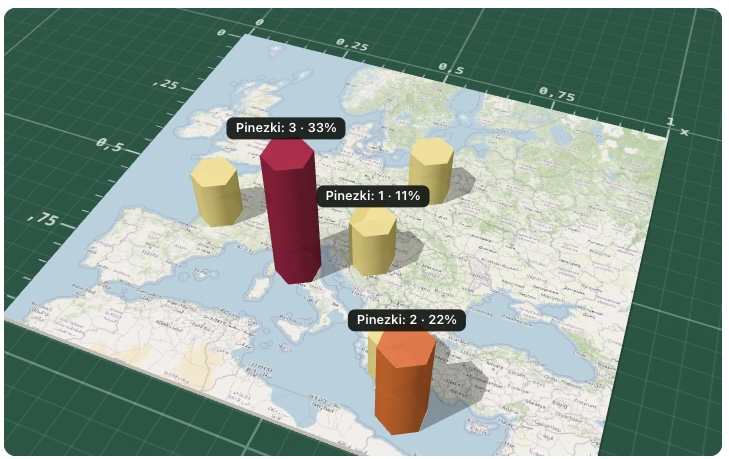
Pinpoint works like Pin on image, in 3D. You save a board: a question and a picture - a map, a diagram, a photo or a scale. The picture lies on a board on a green cutting mat, with a 0-1 ruler around it, under a lamp. Its colours are shown exactly as you uploaded them. You pick one of three modes: an opinion poll, a quiz with a hidden target or labelling the picture with words.
Participants join with a code or QR from their phones, with no account, and place 1-5 pins each with a finger or the keyboard. A magnifier above the finger shows the exact spot with its coordinates, and every pin falls onto the picture with a ripple. On the projector you show the pins or a 3D heat map of hills, from the top, tilted or with the camera orbiting the scene.
See it in action
Pins fall onto the board
Features
Key capabilities
A board under a lamp
The picture lies on a board on a green cutting mat, with a 0-1 ruler around the edge. The colours stay exactly as you uploaded them.
Precise pins
A magnifier above the finger shows the exact spot with its coordinates. With a keyboard, the arrows move a crosshair by 2% (with Shift by 0.5%), Enter places a pin and Delete removes the last one.
Pins or hills
Switch the host view to hills: a 3D heat map of hexagonal columns, where the height is the number of pins. The three tallest show their share of the answers. Look from the top, tilted or in orbit, and drag to turn the scene.
A reveal with a lamp
In a quiz the room goes dim and the lamp beam moves onto the hidden target. The tolerance circle opens, hits jump with a green ring and confetti, misses fade, and the closest pin turns gold.
Label the picture
Words stand on little signs on slanted poles, and the tip of the pole is the measured point. After the reveal, pick a word to see arcs from the wrong spots to the right one, and a list of the words people mixed up most.
Frosted glass
On the projector, in quiz and label modes, pins fall under a frosted glass pane, so the room cannot copy answers. The reveal lifts the glass.
Works on weaker devices
A switch turns on a flat view, and the device remembers it. Without WebGL the tool shows the flat board from Pin on image by itself, and no answer is lost.
Import from Pin on image
Copy an existing Pin on image exercise in one click: the question, the picture, the mode, the words and the hidden answers come along.
Step by step
How it works
Save the board
Type the question, attach the picture and pick the mode, the number of pins and the visibility. Or import an exercise from Pin on image.
Start a session and share the code
Open a session for this group from the board. The host screen shows the code and the QR, and present mode puts them on the projector.
Participants place pins
The group joins on their phones and places pins in the top-down view. The “Look around in 3D” button shows a tilted preview. Until the session closes, they can move a pin and send again.
Read the scene
Switch between pins and hills, turn the camera and talk about where the answers pile up. In quiz and label modes, reveal the answer when everyone is done.
Use cases
What it’s good for
- Quiz questions about a place - “where is the emergency exit?”, “where does the process start?”
- Labelling a machine, a map or an anatomy chart with the words of the lesson
- Opinion polls on a map or a two-axis matrix, read as hills of answers
- Workshops: marking risks on a floor plan or pain points on a customer journey map
- I want the group to point at an exact spot without the room copying the answers
- I want a more striking version of Pin on image for a conference or a big room
White label
Your brand for participants
On the paid plans you can add your company name, logo and colors, and during every session participants will see your brand instead of Verbalu.
Try “Pinpoint” in Verbalu
Create a free account and run your first engaging session today. No card, no installation.