
Live collaboration
Whiteboards
Interactive whiteboards for real-time collaboration - draw, write and invite the group with a single link.
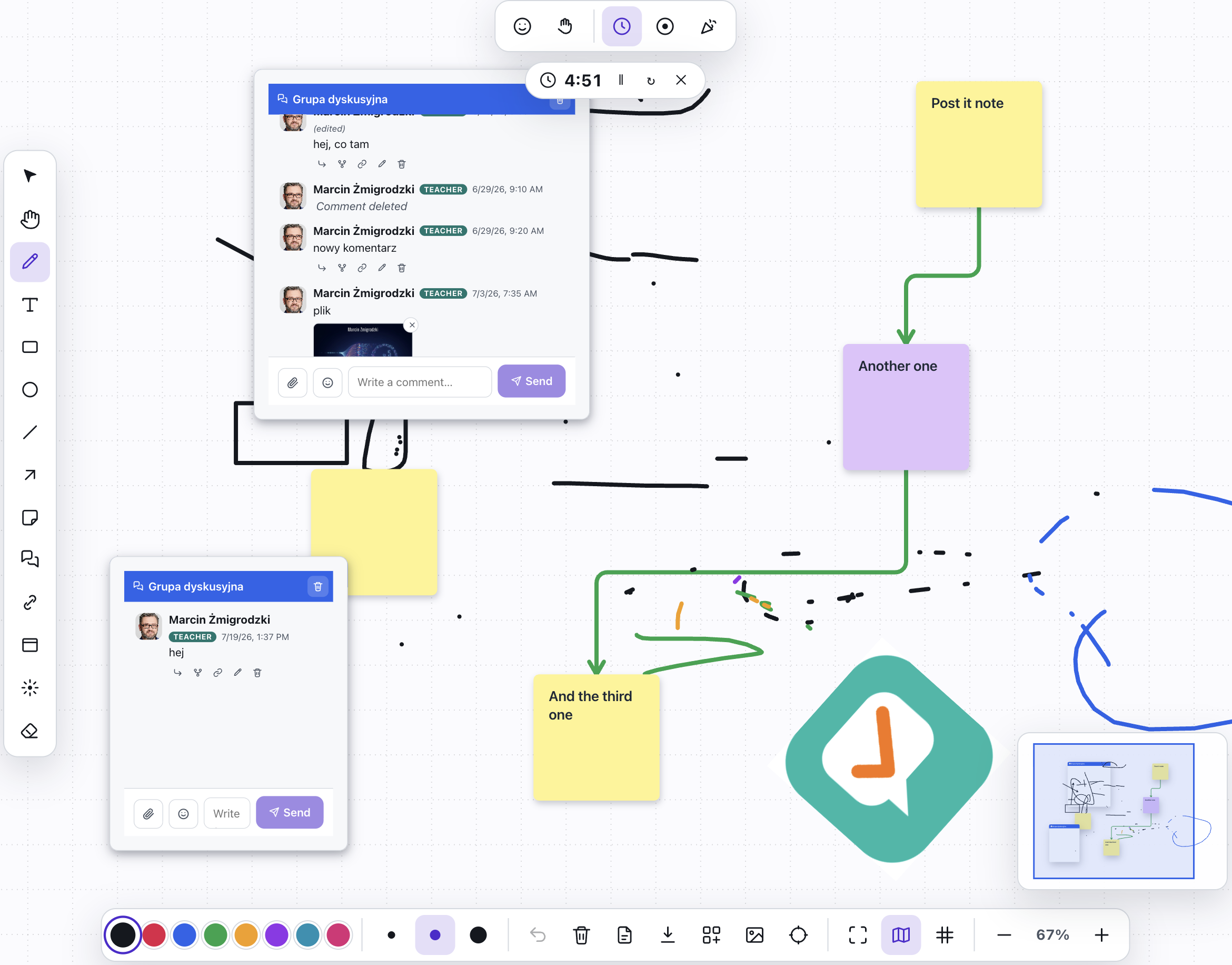
What is Whiteboards?
A whiteboard is an infinite canvas for brainstorming, sketches and shared notes. You get a full toolkit: a marker in three thicknesses, text, rectangles, ellipses, lines and arrows, sticky notes and an eraser.
Everything happens live - changes appear instantly for everyone, and you can see your collaborators’ cursors on the canvas. You share a whiteboard with a link or a QR code that anyone can join anonymously, without creating an account.
See it in action
One canvas, many hands
Features
Key capabilities
A full toolkit
Marker (thin, medium, thick), text, rectangle, ellipse, line, arrow, sticky notes and eraser - with a color picker.
Laser pointer
Show what you’re talking about live - the laser trail glows for a moment and fades, perfect for projector presentations.
Real-time collaboration
Many participants draw at once, and each person’s cursor and presence are visible on the canvas.
Notes and shapes
Drop in colorful sticky notes and shapes, move and arrange elements on the infinite canvas.
Join by link or QR
Share the whiteboard with a QR code or a link - participants join without logging in.
Arranging and alignment
Align and distribute elements, group them, lock them against accidental moves, snap to a grid and navigate a large board with the minimap.
Comments beside the board
A side panel lets the group discuss alongside the drawing - with an unread counter, editable posts and a raise-hand signal when someone wants the floor.
Dot voting
Give everyone a set number of votes and let the group dot-vote the ideas that matter most - start, finish and clear the round with one button.
Templates and export
Start from a ready-made workshop template and save the shared result as PNG or PDF - the board stays with the group after the meeting.
Step by step
How it works
Create a whiteboard
Give it a name and open a blank canvas ready to work on.
Draw and write
Pick a tool, color and thickness, and add shapes, text and sticky notes.
Invite the group
Show a QR code or send a link - participants join and co-create the board.
Work together
Changes sync live; use the laser pointer to guide the group’s attention.
Use cases
What it’s good for
- Brainstorming and mind maps in a workshop
- Designing processes and diagrams together
- A lecture board visible to the whole group online
- Retrospectives and sticky-note exercises
- A shared drawing space for a remote workshop
- I want the whole group writing on one board at once
- A flipchart replacement for a group that meets online
White label
Your brand for participants
On the paid plans you can add your company name, logo and colors, and during every session participants will see your brand instead of Verbalu.
Try “Whiteboards” in Verbalu
Create a free account and run your first engaging session today. No card, no installation.