
Training simulation
Project Simulation
A team of 3-4 runs one waterfall project from the plan to the handover. First they build the schedule on a Gantt chart themselves, staff the tasks and promise the steering committee a date and a budget. Then the simulation executes exactly that plan, round by round: with e-mails, phone calls, visits from people on the team, phase gates and an earned value report. At the end they see the truth that was not in the reports.
What is Project Simulation?
Every team gets the same project. In the built-in scenario it is the launch of a distribution centre in a leased hall: 13 tasks in four phases, 8 people with different skills and availability, two contractor offers and the sponsor's limits - a deadline in round 18 and a budget. On the Gantt chart the team decides who works on which task, which estimate to plan on, which offer to take, how to respond to the risks and how much reserve to keep. A status bar says at every moment what the plan is missing: an end past the deadline, a cost over the budget, overloaded people, tasks with nobody on them. Once approved, the plan becomes the baseline.
Then execution starts. One round is one project week. The inbox holds e-mails, chats and calls that ask for a decision, someone from the team or a stakeholder walks in with information no report contains, and on the 3D construction site the hall goes up. The team has 10 attention points per round and chooses what to spend them on: answering a message, a one-to-one talk, a quality review or a check on site. After each phase it reports its status and a forecast to the committee. All teams play in the same world, so a difference in results is a difference in decisions, and the summary sets the reports against what was really going on.
See how it works
First the plan, then its consequences, round by round
Features
Key capabilities
A plan that really gets executed
There are no “team size” and “schedule pressure” sliders here. The simulation runs the schedule the team drew: its staffing, the estimates it chose, its reserve and the date it promised. An architect put on two tasks at once or an optimistic estimate comes back in the rounds as slippage and cost.
An inbox of e-mails, chats and calls
Messages that need a decision arrive during the rounds: the IT director pulls the architect out for an outage, the supplier delays the racks, the sponsor wants to open a week earlier. Every option states its effects, and not answering is a decision too - usually the worst one. Some messages are false alarms.
Visits: the important news does not come in a report
A team member or a stakeholder walks in mid-round and says something no screen shows. The point often comes only after a follow-up question. Nobody brings an early warning to a manager who has worn the team out or let the sponsor down - and the team never learns that it missed something.
A construction site in 3D
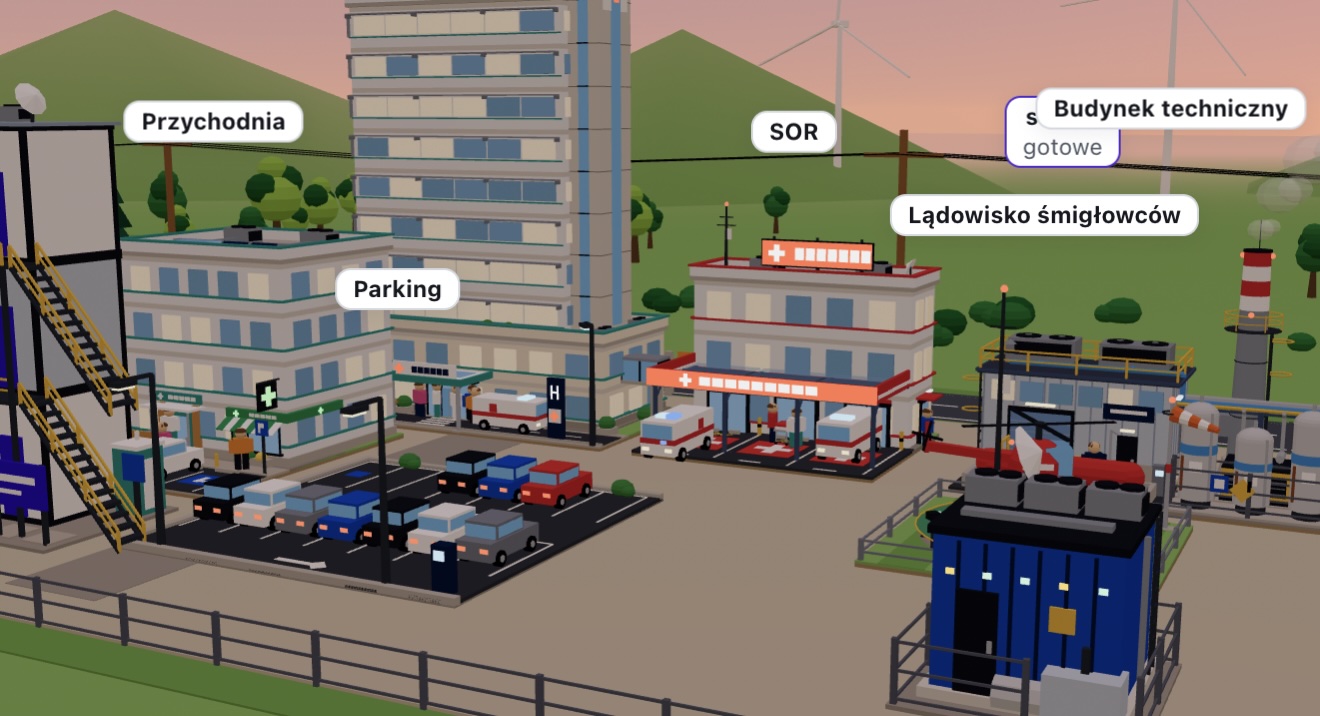
The hall, the racks, the dock and the server room grow with the progress of the tasks. The site shows what the reports say, not the truth: only a check on site reveals how much has really been done. The same scene is the cover of the simulation, and on the trainer's screen it makes up the wall of every team's site. In your own scenario you build what you like: a railway station, a refinery, an airport, an office tower, a conference centre or a hospital, in one of six sceneries, with day and night passing over the site.
Phase gates and earned value
After each phase the team reports to the steering committee: a status in three colours, a forecast of the finish and the final cost, a request for budget or time. After every round it sees PV, EV, AC, SPI and CPI. How accurate the forecasts were is part of the score, and a status painted green costs the sponsor's trust.
A trainer's console and your own scenarios
You run the rounds synchronously (you open each one for the whole room) or asynchronously (teams play at their own pace, with a stop point for the debrief). The console shows each team's readiness and indicators, the event deck and the truth behind the reports. In the editor you put together your own scenario: effects are picked from a closed list, AI proposes the construction site, and three bots check that the whole thing is balanced.
Step by step
How it works
Pick a scenario and open a session
Take the built-in distribution centre or a scenario of your own. Set the number of teams and how the rounds are run, then put the code and the QR on the screen.
Teams build the plan
Participants join from their own devices, pick a team and work on one shared Gantt chart: they staff the tasks, level the overloads, choose a contractor and their risk responses. Last, they promise the committee a date and a budget.
Execution, round by round
Each round brings the inbox, visits, attention points and the construction site, and ends with a report. A phase ends with a gate and a report to the committee. You watch every team on the console.
Show the truth and debrief the decisions
The summary splits the score into six parts, sets the reports against the truth and lists the visits that never took place. The decision map shows which team chose which option. Those who want to can play again in the same world.
Use cases
What it’s good for
- A practice day after a project management module: planning, execution and debrief in one training.
- A management academy or a development programme for project managers, with a scenario from the participants' own industry.
- University and postgraduate classes on scheduling, resources and earned value.
- Preparing for PMI, PRINCE2 or IPMA certification: resource levelling, the baseline, EVM and a report to the steering committee in practice.
- Work between sessions: teams play asynchronously and a stop point waits for the joint debrief.
- A conversation about reporting and trust in a project: after the game it is clear who heard about problems early, and why.
White label
Your brand for participants
On the paid plans you can add your company name, logo and colors, and during every session participants will see your brand instead of Verbalu.
Try “Project Simulation” in Verbalu
Create a free account and run your first engaging session today. No card, no installation.