
Q&A / AMA session
Ask the host
An “Ask Me Anything” session - participants ask questions (anonymously too), while you answer and organize them live.
What is Ask the host?
This is a tool for running question-and-answer sessions (AMA - “Ask Me Anything”). You open a session and display a QR code and a letter code on the projector.
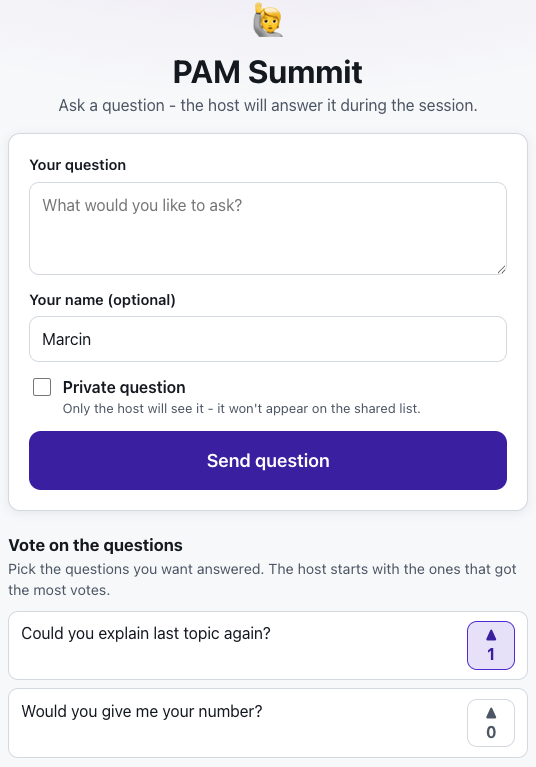
Participants join and type their questions - anonymously too, if they prefer. Questions arrive on your screen live, and you answer them out loud and mark their status, keeping the whole queue under control.
See it in action
Questions flow in live - you stay in control of the queue
Features
Key capabilities
Live questions
Questions appear on your screen the moment participants send them.
Anonymous mode
Participants can ask under their name or completely anonymously - making candor easier.
Organize with statuses
Mark questions as answered, deferred for later, or deleted to stay on top of the queue.
View filters
Switch between pending, answered, deferred and trashed questions.
Join by code or QR
Participants enter with a single scan or a letter code, no login.
Private questions
A participant can mark a question as private - it then reaches only you and never appears on the shared list.
Opening and closing the session
Close the intake when you want to answer what has already arrived, and reopen it when the group is ready to ask more.
Step by step
How it works
Launch a session
Give the session a topic and open the host screen with a code and QR.
Display the code
Show the code on the projector so participants can join from their phones.
Collect questions
Participants type questions, anonymously too - they land straight on your board.
Answer and organize
Answer out loud and mark questions as answered, deferred or deleted.
Use cases
What it’s good for
- A Q&A session at the end of a lecture or training
- Collecting questions from a quiet or shy group
- Anonymous questions on difficult or sensitive topics
- “Ask me anything” meetings with an expert
- The room goes quiet and nobody asks anything out loud
- I want to collect questions from the audience during the talk
- A channel for anonymous questions to the speaker or to management
White label
Your brand for participants
On the paid plans you can add your company name, logo and colors, and during every session participants will see your brand instead of Verbalu.
Try “Ask the host” in Verbalu
Create a free account and run your first engaging session today. No card, no installation.