
Project management tool
Waterfall project
A workshop-grade waterfall project planner: a WBS, a Gantt chart with four dependency types, the critical path, resources, a baseline and earned value (EVM) - all live, together with your participants.
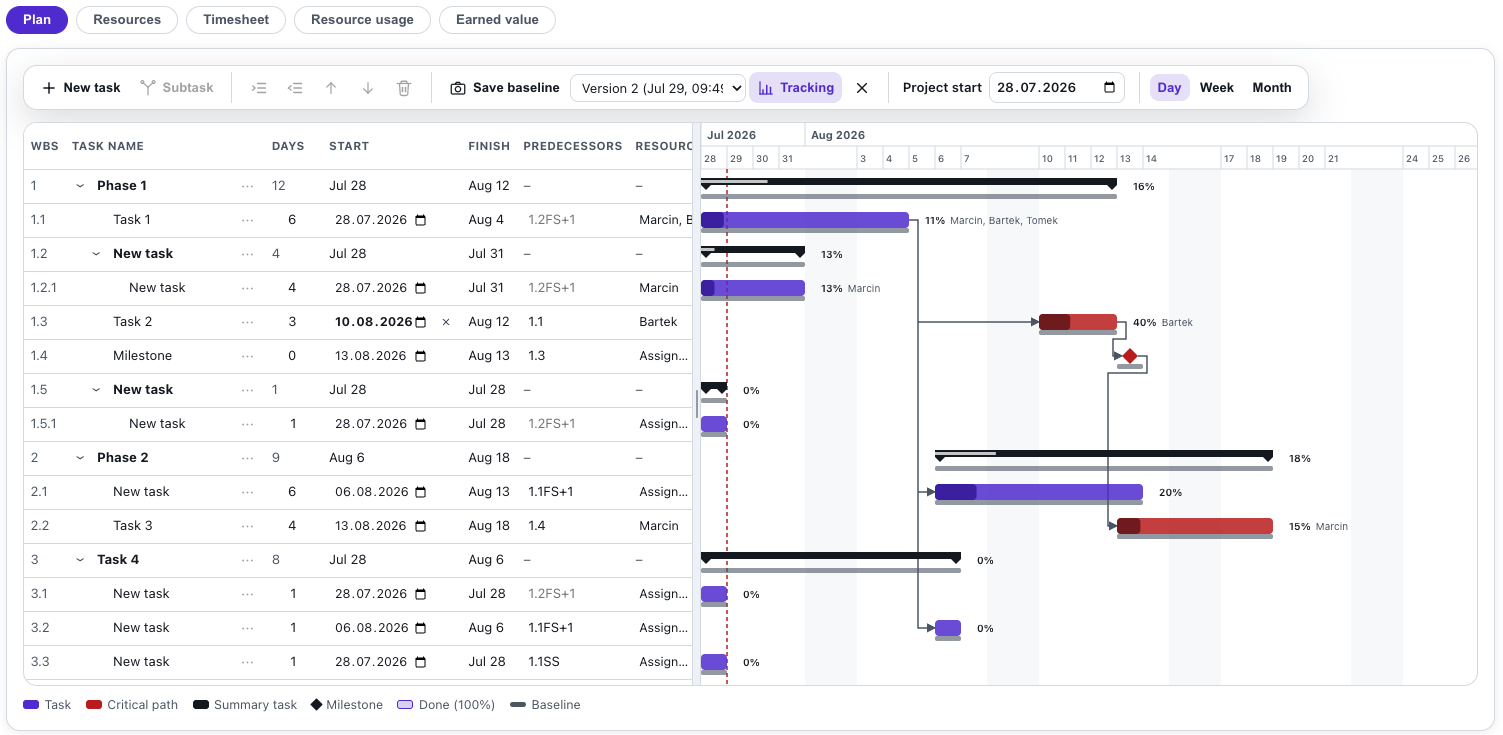
What is Waterfall project?
Waterfall project is a workshop-grade planner for classic waterfall (predictive) projects. You build a work breakdown structure (WBS) with subtasks and summary tasks, set durations in working days and type dependencies exactly like in the big tools: 2FS+1, 5SS, 4FF-2. The schedule recomputes instantly, weekends are skipped and the critical path lights up in red.
Add resources and allocate them to tasks, and the tool warns about overallocation. When the plan is agreed, save the baseline - from then on one Gantt chart and one table show the plan, the execution and the variances. Once the team reports hours and progress, the earned value report (EVM) computes PV, EV and AC with the SPI and CPI indices on its own. Participants join with a code or QR, watch the plan live, and in workshop mode they plan together with you.
Features
Key capabilities
WBS with summary tasks
Subtasks, indentation and 1.1, 1.2… numbering. Summary dates, durations and progress roll up from the children automatically.
Four dependency types
FS, SS, FF and SF with lag or lead, typed in the standard scheduling notation (2FS+1). The arrows draw themselves on the chart.
Critical path
A full forward and backward CPM pass: zero-slack tasks glow red, so everyone sees what really drives the end date.
Resources and overallocation
Add people or teams, allocate them with percent units, and the tool counts the days where someone is over 100%.
Baseline and tracking
One click freezes the schedule. Then the same chart shows baseline bars under the current ones, and the table shows start and finish variances.
Resource timesheet
Every resource reports worked hours and % complete, and the report lines them up with the plan: dates, variances and hours in one table.
Step by step
How it works
Build the WBS
Add tasks and subtasks and set durations in working days; a zero duration makes a milestone.
Link the dependencies
Type predecessors (FS/SS/FF/SF with lag) and the schedule plus the critical path recompute instantly.
Allocate resources
Add people and teams, assign them to tasks and level the overloads the resource panel highlights.
Save the baseline and track
Freeze the agreed plan, update progress and dates, and read the variances on one Gantt and in one table.
Use cases
What it’s good for
- Project management training - from the WBS to the critical path
- PMI, PRINCE2 or IPMA certification prep on a living plan
- Workshop planning of the team's real projects
- A change exercise: save the baseline, inject an event and measure the variances
- Academic classes on scheduling and the CPM method
- Teaching earned value management: PV, EV, AC, SPI and CPI on a living plan
White label
Your brand for participants
On the paid plans you can add your company name, logo and colors, and during every session participants will see your brand instead of Verbalu.
Try “Waterfall project” in Verbalu
Create a free account and run your first engaging session today. No card, no installation.