
Training game
Airport
A PMO simulation: build an airport in 15 turns while managing a project portfolio, scarce resources and strategic benefits.
What is the Airport simulation?
Every participant becomes the PMO director of an airport development programme. Each turn new project cards hit the table - runways, terminals, cargo, hotels, rail, IT systems. The player decides what to launch, how to staff stages with five types of scarce specialists, and when to tender a project out to an external contractor: pricier, but immune to bottlenecks (the classic make-or-buy).
Productivity is slightly random, and a shared event deck (strikes, inflation, weather, grants, demand booms) hits everyone in the same rounds. Delivered projects accrue strategic benefits - profit, passenger and cargo throughput, and capabilities that unlock dependent projects. The portfolio wins, not any single project.
Features
Key capabilities
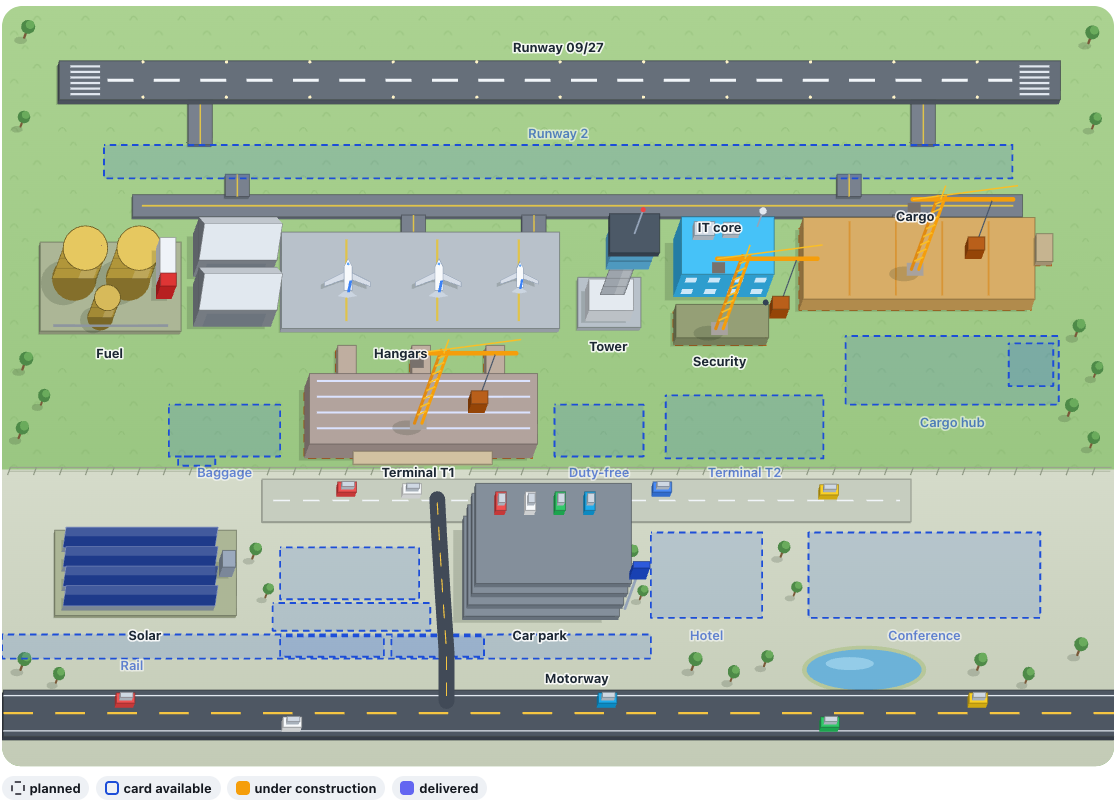
Airport terrain map
The master plan as a map: plots go from planned to under-construction to delivered - you watch the programme grow turn by turn.
Project cards & dependencies
Every project has stages, resource requirements, a cost and prerequisites - no terminal without a runway, tower and IT core.
Portfolio report like in a PM tool
Resource utilization vs availability and a projects × resources matrix expose bottlenecks before they stall the programme.
Goals & strategic benefits
Minimum infrastructure, passenger and cargo throughput, profit per turn and budget discipline - five goals settled at the end.
Make or buy
You can tender a project stage out to an external contractor instead of staffing it yourself - but overseeing the contract still eats into the office’s resources.
Step by step
How it works
Create a session
One click rolls the scenario: the offer schedule and the event deck, identical for every player.
Invite participants
Code or QR from the trainer console - participants join anonymously from phones and laptops.
Players run their programmes
Turn by turn: new cards, launch decisions, resource allocation, tenders and risk responses.
Compare portfolios
The live leaderboard and the event deck in the trainer console are ready-made debrief material.
Use cases
What it’s good for
- Project-portfolio management and PMO trainings.
- Workshops on critical resources, prioritisation and make-or-buy decisions.
- A benefits-management module for programmes - from outputs to value.
- Show how a portfolio of several projects is managed at once
- A simulation about projects competing for shared resources
- Explain prioritisation and make-or-buy decisions
White label
Your brand for participants
On the paid plans you can add your company name, logo and colors, and during every session participants will see your brand instead of Verbalu.
Training by Octigo
Want this run as a full training?
You are free to run our games and simulations on your own. But if you would like us to deliver a complete training, with a professional debrief and the concepts behind the “Airport” simulation explained in depth, get in touch. Octigo is a professional training company with 20 years of experience and many awards for its simulations.
- 20 years of experience in corporate training
- Award-winning training simulations
- A professional debrief and takeaways after the session
- A programme tailored to your goals and your team
Prefer to write to us directly? szkolenia@octigo.pl
Try “Airport” in Verbalu
Create a free account and run your first engaging session today. No card, no installation.