
Workshop tool
Dot Chart process maps
The simplest process maps: write down the roles, write down the tasks, connect the dots.
What is Dot Chart process maps?
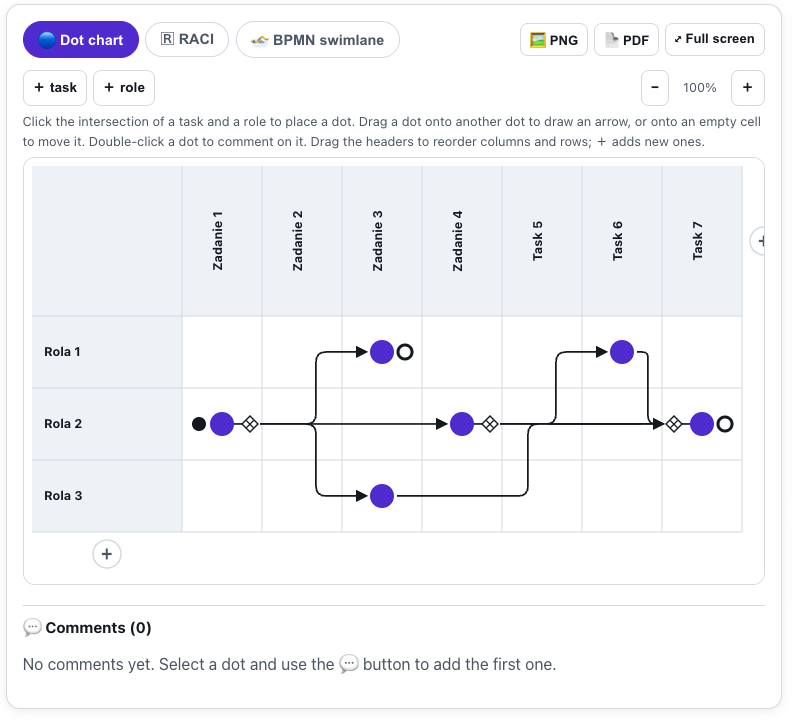
Dot Chart is a notation that takes two minutes to learn: rows are roles, columns are tasks, and a dot on an intersection says "this role performs this task". Arrows between dots define the flow, and XOR / OR / AND gates describe decisions and parallel work.
The whole group sees the map live, and in workshop mode participants edit it together with the host and pin comments to the steps. One click turns the map into a BPMN swimlane diagram (export to PNG, PDF and BPMN 2.0 XML) and into a RACI matrix (CSV export).
See it in action
From dots to BPMN and RACI
Features
Key capabilities
Dots instead of notation
You don't have to be an analyst: you click role/task intersections, drag dots, and the map grows at the pace of the conversation.
Automatic BPMN
One click builds a diagram with a lane per role, XOR/OR/AND gateways and start/end events - downloadable as PNG, PDF or BPMN 2.0 XML.
RACI matrix
Dots become the R letters and you add the A / C / I marks with one tap. CSV export for Excel.
Live workshop
Participants join by code or QR, watch the map live, and in workshop mode co-edit it and pin comments with improvement ideas.
Step by step
How it works
Write down roles and tasks
Create a session and name the rows (roles) and columns (tasks) of the process.
Connect the dots
Place dots on the intersections and drag them onto each other to draw the flow; set gates where the process branches.
Invite the group
Share the code or the QR. Switch on workshop mode so participants map together with you and comment on the steps.
Convert and export
Switch to the BPMN or RACI tab and download the ready files: PNG, PDF, BPMN 2.0 XML, CSV.
Use cases
What it’s good for
- Process-mapping and optimisation workshops in a company or public office
- Process-management classes - from a simple map to BPMN notation
- Agreeing a team's split of responsibilities (RACI)
- Remote process interviews with experts - you take notes at the pace of the conversation
- Map a process with a group that knows no notation
- Work out quickly who is responsible for what
- Capture a process at conversation speed during an expert interview
White label
Your brand for participants
On the paid plans you can add your company name, logo and colors, and during every session participants will see your brand instead of Verbalu.
Try “Dot Chart process maps” in Verbalu
Create a free account and run your first engaging session today. No card, no installation.