
Learning at your own pace
Courses
Training that does not need everyone in the room at the same time. Every learner enters with their own code, works through the path when it suits them, and the course remembers where they stopped - a week or three months later.
What is Courses?
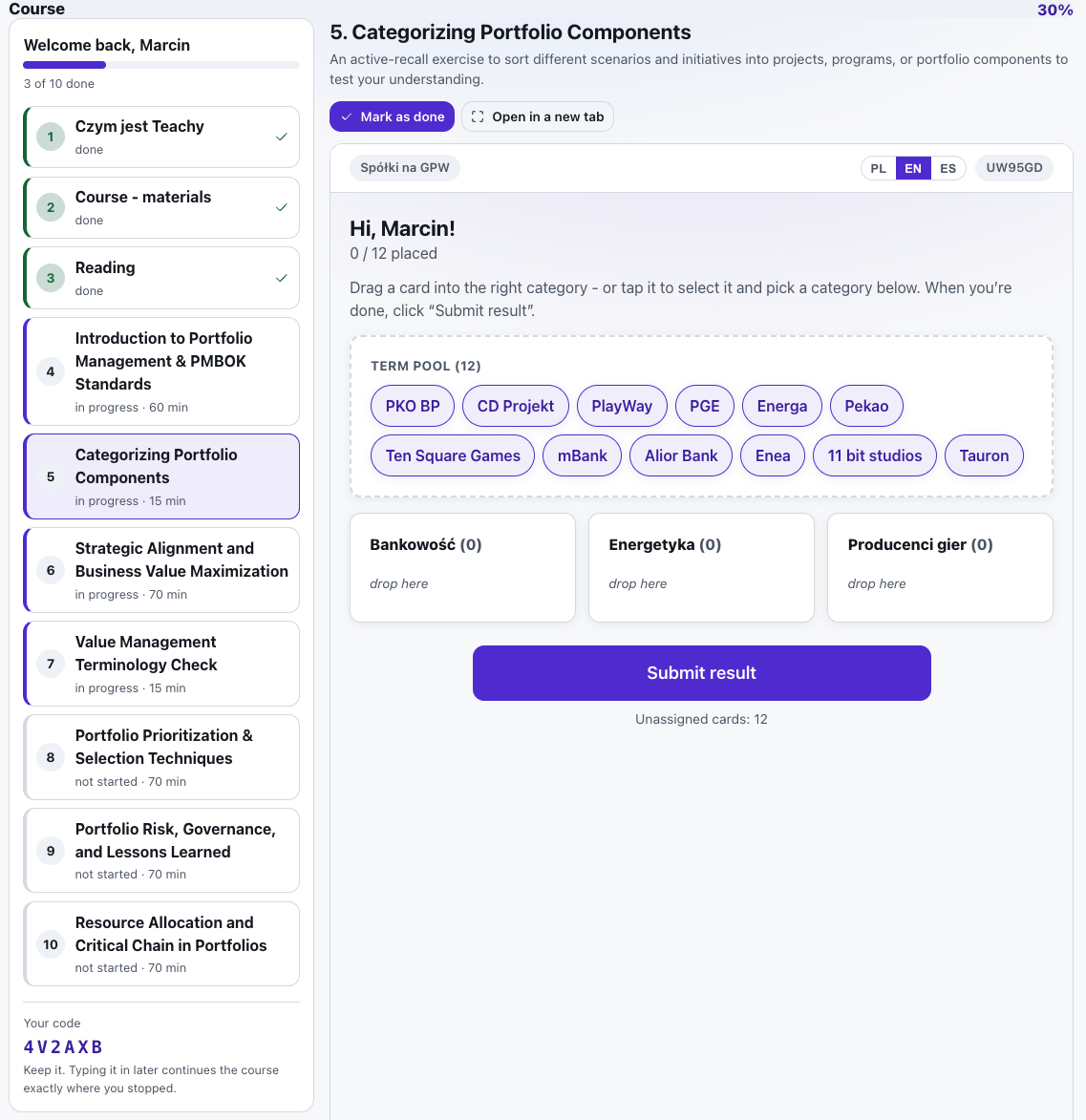
A course is the self-paced sibling of an event. An event runs on the trainer's clock: one activity is live and the whole room follows. A course runs on each learner's clock: the modules are open from day one, and a new hire can read a chapter on Monday, take the quiz on Thursday and finish the path a month later.
The path is built out of the tools you already use in Verbalu - wiki chapters, self-paced quizzes, fill-in-the-blank and matching exercises, crosswords, role-plays with AI characters, discussion threads, file folders. What holds it together is the individual access code: one per learner, so entering it on another device three months later restores their exact place, and so the report can say who has got how far and what they scored.
See it in action
Your own code, your own pace
Features
Key capabilities
One code per learner
The trainer mints a code for each person (or a batch of blank ones to hand out). The code is their identity, their link and their QR - no accounts, no passwords.
Continue months later
Every visit is remembered. Whoever comes back - on a phone, on another laptop - lands on the same path with everything they have already done ticked off.
Built from your own tools
Reading, quizzes, exercises, role-plays and discussions come from the tools you already have. Nothing has to be authored twice.
A report per learner and per module
Who has started, who has finished, what they scored in every quiz and exercise, and which module the whole group struggles with. Exports to CSV.
Free path or strict order
Let learners roam, or require the modules in sequence so each one unlocks when the previous is done. Extra modules can be marked optional.
Retakes and recertification
Clear one learner's progress and their code takes them through the same course again - the yearly refresher without a new link.
Self-enrolment or a fixed roster
Share the course code and learners enrol themselves, each getting their own code back; or turn that off and hand out codes from a roster you control.
A public signup page
A course can have its own page with a description, goals, a start date, hosts and a gallery. Visitors leave a registration, you approve it, and an approved learner gets their personal code and link by e-mail.
E-mails to learners
A welcome with the link, a receipt and decision for every signup, materials on a chosen date, a certificate for passing a quiz or finishing the course, and a weekly nudge. You write every message yourself and nothing goes out until you switch it on.
AI drafts the path and the content
Paste a description or point at source materials and AI lays out the modules and writes their content - readings, quizzes, exercises. You edit instead of starting from a blank page.
Learner screen themes
Six ready-made looks - from classic to midnight - restyle the whole learner screen with one click. The signup page has its own themes and layouts too.
In your LMS and in Teams
Download the SCORM 1.2 connector and upload the course to Moodle, Canvas or another LMS: it records that the course was started, the progress and the completion, while the content stays in Verbalu. There is also an app package for Microsoft Teams and embed code for an intranet page.
Language versions
One course in several languages: AI translates the readings, quizzes, exercises and e-mails into the languages you choose, keeping the same steps and correct answers. Participants choose their language when they sign up and can change it midway, and the report combines the results of every version.
Step by step
How it works
Create the course
Name it and write the short intro learners read first.
Build the path
Add modules: readings, wiki chapters, quizzes, exercises, discussions. Set an estimated time and group them into chapters.
Hand out the codes
Add learners by name (or generate blank codes) and share each personal link or QR - by e-mail, on paper, in your onboarding checklist. Or switch on the public signup page and let people register themselves.
Watch the report
Follow progress and scores per learner and per module, and export the whole thing to CSV when HR asks.
Use cases
What it’s good for
- Onboarding a new hire: everything they must read and know in their first two weeks
- An annual compliance refresher every employee retakes, with the quiz score on record
- Pre-work before a workshop, so the room arrives with the theory already read
- The follow-up after a training day - handed out as the last item on the agenda
- A certification path where a quiz has to be passed before the next chapter opens
- A follow-up assignment a group works through at its own pace between sessions
White label
Your brand for participants
On the paid plans you can add your company name, logo and colors, and during every session participants will see your brand instead of Verbalu.
Try “Courses” in Verbalu
Create a free account and run your first engaging session today. No card, no installation.