
Tool · Random picker
Wheel of Fortune
Build your own wheel of fortune - from text or images - and spin it on screen. A prettier, session-ready take on the popular random picker.
What is Wheel of Fortune?
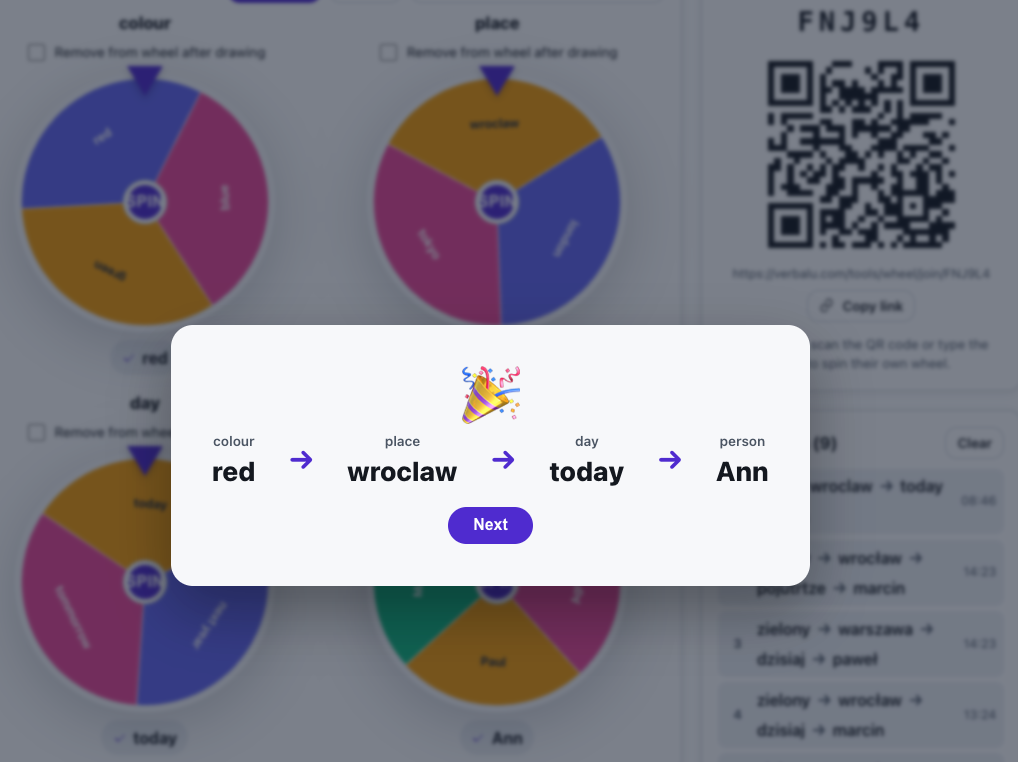
The wheel of fortune is the simplest way to run a fair, exciting draw in a session. You type the options and the app lays them out as a colourful, animated wheel. One click spins it smoothly before revealing a winner with a burst of confetti.
Any option can be replaced with an image (up to 2 MB), you can turn on random order, and every result is logged in a table. Participants can join by QR code and spin their own wheel on their phone - great for individual work.
See it in action
Click, spin, meet the winner
Features
Key capabilities
Text and images
Each option can be text, an image, or both - upload pictures up to 2 MB.
Eye-catching animation
Smooth spin with ease-out and a confetti celebration of the winner.
Random order
Turn on shuffling so the wheel's layout is unpredictable every time.
QR code for participants
Participants scan a code and spin their own wheel on their phones.
Results table
Every draw is saved to a table you can clear whenever you like.
Up to four wheels at once
Line up as many as four wheels and spin each one - the drawn combination, one option per wheel, is saved as a single result.
Remove after the draw
Turn on remove-after-draw so no one comes up twice, and clear the results table with one click before the next group.
Step by step
How it works
Create a wheel
Type options or paste a whole list, add images and choose random order.
Show it on screen
Open the presentation screen with a big wheel plus a QR code and link for participants.
Spin
Click the centre of the wheel; after it slows down the winner appears with animation and confetti.
Log the result
The drawn option goes into the table - keep drawing or clear the list.
Use cases
What it’s good for
- Fairly pick a participant to answer or do a task.
- Choose a question, a topic or the presentation order.
- Draw prizes, group roles or practice pairs.
- A warm-up or gamification moment at the start of a session.
- Pick someone in a way the room actually watches
- A wheel for drawing prizes or tasks
- Add a bit of chance and gamification to the lesson
White label
Your brand for participants
On the paid plans you can add your company name, logo and colors, and during every session participants will see your brand instead of Verbalu.
Try “Wheel of Fortune” in Verbalu
Create a free account and run your first engaging session today. No card, no installation.