
Discussions & comments
Discussion groups
A chat-style forum for your group - create discussion groups and let participants comment in threads, joining by link or QR code.
What is Discussion groups?
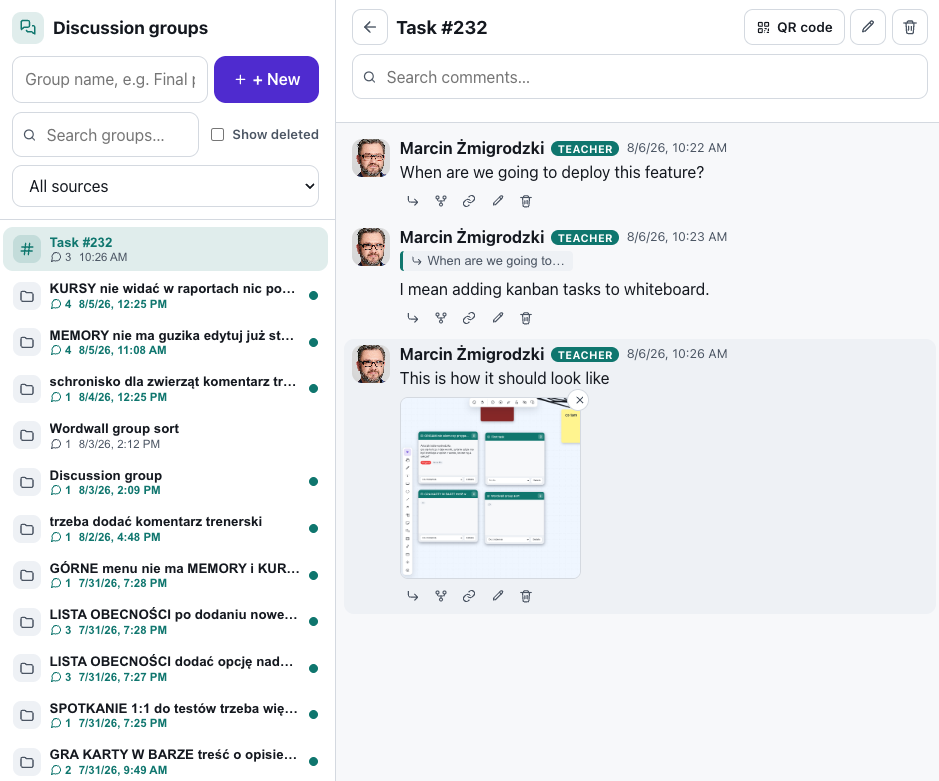
Discussion groups are a lasting space for conversation beyond the lesson. Create as many groups as you like - for a group, a project or a topic - and give each a name. Every group has its own comment thread in a Slack-inspired layout: the group list on the left, the discussion on the right.
Participants enter a group by link or QR code, with no sign-up - they just type their name. They can read, comment and reply to comments, while you moderate everything. Groups with new, unread comments are highlighted, so you instantly see where the conversation is happening.
See it in action
One group, many threads
Features
Key capabilities
Comment threads
Each group is a clear thread - comments show the author's name plus date and time.
Replies without nesting
Reply to a specific comment - the reply links back to the original, but the list stays flat and readable.
Unread marker
Groups with comments you haven't seen yet are highlighted in the list.
Filtering
Filter groups by name, and comments within a group by keywords.
Join by code or QR
Participants join with a single scan or letter code, entering only their name.
Attachments in comments
Attach files and photos to any post - the discussion and the material it refers to stay in one place.
Forking threads
When a conversation drifts, fork it into its own group - the thread takes on a life of its own and the original discussion stays on its question.
A discussion next to any tool
A discussion group can hang off a kanban task, a wiki article, a whiteboard or a form page - the conversation sits exactly where the work is.
Step by step
How it works
Create a group
Give the group a name - it appears in the list on the left.
Share the code
Show the QR code or letter code so participants can enter the group.
Discuss
Participants post comments and replies while you moderate and respond.
Come back to the conversation
Highlighted groups show you where new comments are waiting to be read.
Use cases
What it’s good for
- A standing space for questions after a lesson or training
- Discussion around a project or group work
- Collecting ideas and feedback between sessions
- A place for course materials and comments
- I want the discussion to continue between sessions
- Somewhere to ask questions after the course has ended
- A simple forum for learners that needs no accounts
White label
Your brand for participants
On the paid plans you can add your company name, logo and colors, and during every session participants will see your brand instead of Verbalu.
Try “Discussion groups” in Verbalu
Create a free account and run your first engaging session today. No card, no installation.