
Group decisions
Group voting
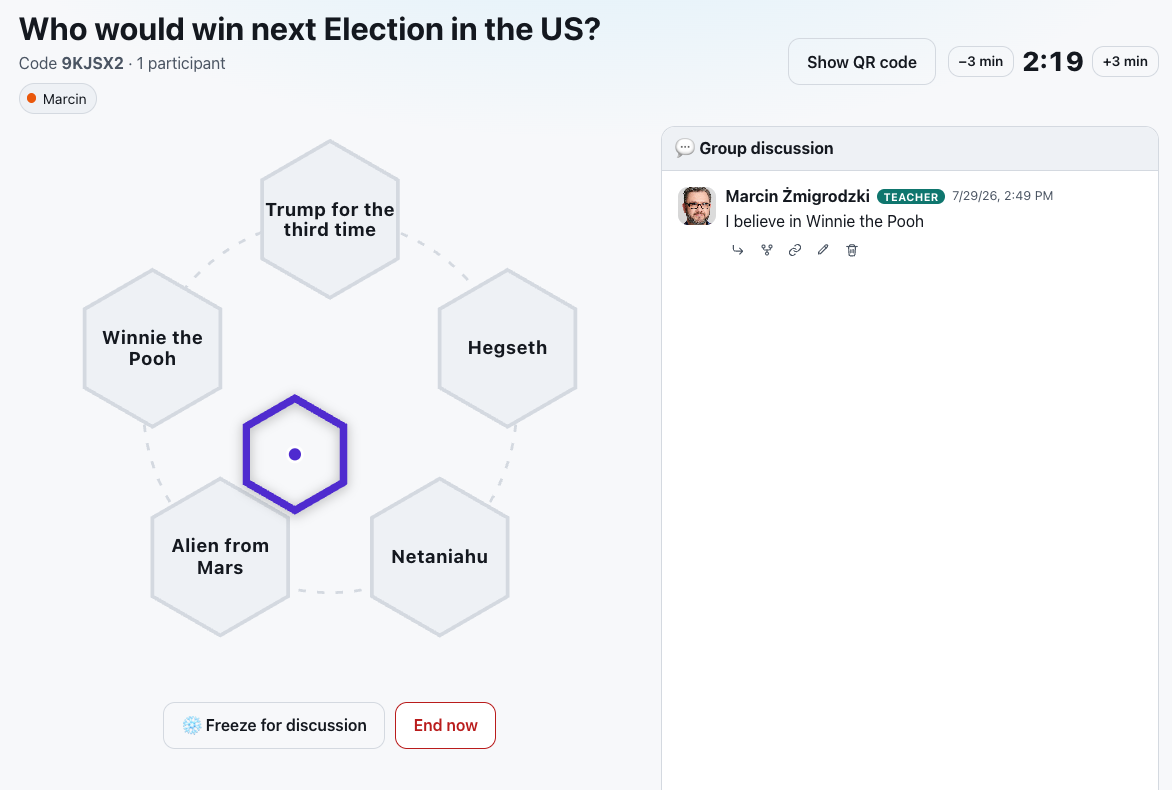
Swarm-style group decision making - participants see a honeycomb of answers, discuss in a chat and together drag one shared marker toward the answer they agree on.
What is Group voting?
You define a question and up to six answers laid out as a honeycomb. Questions are saved to your organization’s library so you can run session after session from them - sharing a code or QR code. Participants join from their phones without logging in, entering only their name.
In a session everyone grabs the same shared marker and drags it toward their answer. Each person pulls only a little - a single move nudges the marker just a touch - so it reaches a target only through the combined force of the whole group, which has to agree. A group discussion runs alongside, and every session’s result is saved.
See it in action
One marker, one group - consensus on the honeycomb
Features
Key capabilities
Honeycomb of answers
A question and up to six answers in a clear hexagonal layout the shared marker moves across.
One shared marker
The whole group drags the same marker - the resultant counts, so you decide together for real.
Live discussion
A group chat runs alongside the vote so participants negotiate and justify their choice.
Question library and results
Save reusable questions, launch sessions from them and revisit the saved results.
Join by code or QR
Participants join from their phones with one scan or code, entering only their name.
Freeze for discussion
Freeze the marker in place when the group needs to talk it through, then let the dragging resume - freezes are limited, so they have to be spent wisely.
Round time in your hands
Every question has its own time limit, which you can shorten or extend mid-round - or end the vote at once when the group has clearly agreed.
Step by step
How it works
Build a question
Enter the question and up to six answers, then save it to the library.
Launch a session
Start a session from the question and open the host console with its code and QR.
Participants join
The group joins by code or QR and sees the honeycomb on their own devices.
Negotiate together
Everyone drags the shared marker and discusses until the group lands on one answer.
Use cases
What it’s good for
- Making a decision together as a group or a team
- Negotiating priorities and agreeing on a shared position
- An exercise in building consensus and collaboration
- An engaging vote with discussion instead of a plain poll
- I want the group to arrive at one shared decision
- An exercise in building consensus
- Choose a priority together instead of out-voting the minority
White label
Your brand for participants
On the paid plans you can add your company name, logo and colors, and during every session participants will see your brand instead of Verbalu.
Try “Group voting” in Verbalu
Create a free account and run your first engaging session today. No card, no installation.