
Interactive exercise
Match categories
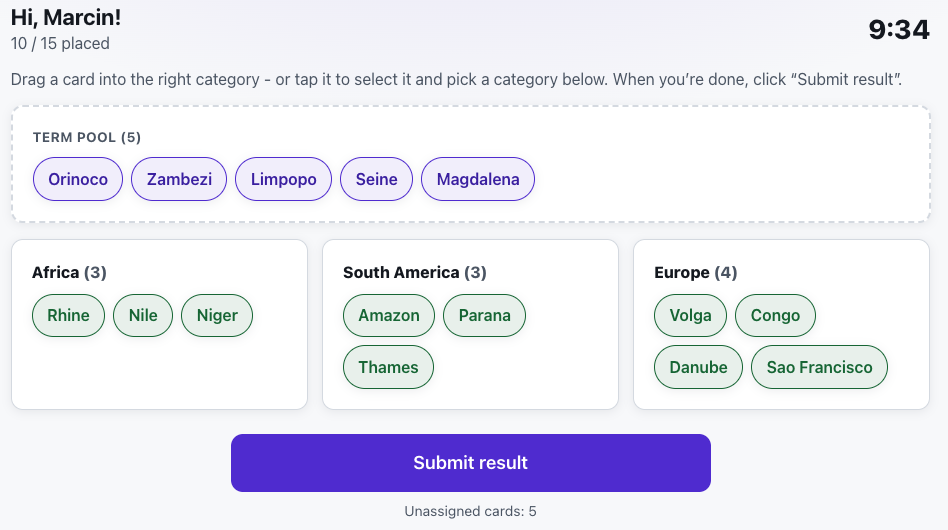
Participants drag cards into the right categories while you watch their progress live.
What is Match categories?
In this exercise you define categories and the terms that belong to them. You save a set to the library and run sessions from it, sharing a code or a QR code.
Participants drag shuffled term cards into the right categories and submit their result. You see live who matched how many correctly and who has finished. You can set a time limit with auto-finish, or end the exercise manually.
See it in action
Cards find their categories - and you watch progress live
Features
Key capabilities
Drag into categories
Participants arrange shuffled term cards into the right buckets.
Live progress
For each participant you see how many cards they placed, how many correctly and whether they submitted.
Optional time limit
Set a time with auto-finish, or run the exercise without a limit and end it manually.
Reusable sets
Create, edit and duplicate sets of categories and terms for future sessions.
Session reports
When you finish, review the results in the reports from your sessions.
AI-built exercises
Describe the topic and the AI proposes the categories and the terms that belong in them - check and edit the exercise before the session.
Step by step
How it works
Define a set
Add categories and assign matching terms to them, and set a default time limit.
Launch a session
Start the exercise and show the code and QR code to participants.
Participants match
The group drags cards into categories and submits their solutions.
Track and grade
Watch progress live and review the results in a report after it ends.
Use cases
What it’s good for
- Classifying concepts into thematic groups
- A reinforcement exercise after a theory module
- A race to see who matches fastest and most accurately
- Diagnosing which distinctions the group finds difficult
- Check whether the group can tell similar concepts apart
- An exercise in sorting and grouping information
- See which categories participants keep confusing
White label
Your brand for participants
On the paid plans you can add your company name, logo and colors, and during every session participants will see your brand instead of Verbalu.
Try “Match categories” in Verbalu
Create a free account and run your first engaging session today. No card, no installation.