
Feedback and ratings
Surveys
Collect feedback - choice, scale ratings, sliders and open answers, with live results and CSV export.
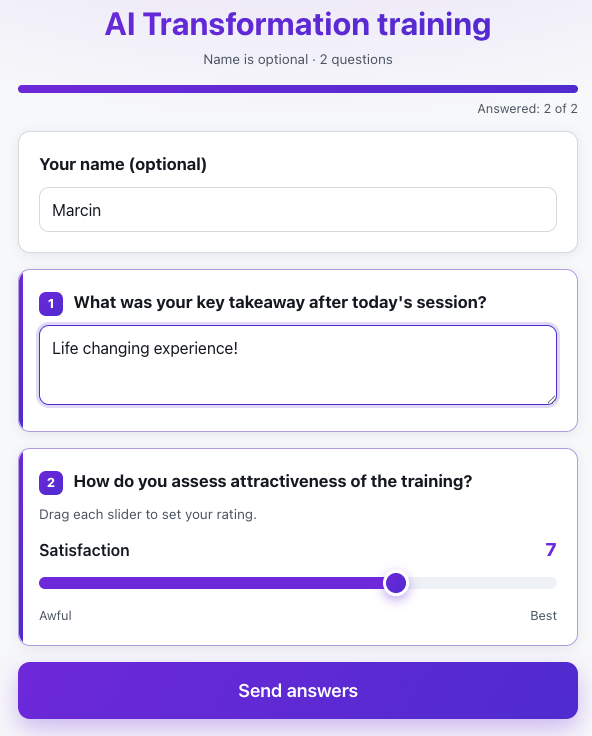
What is Surveys?
Surveys let you build a reusable template and then launch rating sessions from it. You compose questions of five kinds, mark any of them as required, and save the finished template for reuse.
During a session, participants fill in the survey anonymously on their phones after scanning a QR code or entering a letter code. Results aggregate live, you discuss them with the room, and export to a CSV file whenever you need.
See it in action
The group answers, results grow live
Features
Key capabilities
Five question types
Single and multiple choice, a scale rating (e.g. 1–5 or 1–10) with labeled ends, sliders that rate several dimensions in one question, and an open-ended question.
Required questions
Mark which questions must be answered before the survey can be submitted.
Reusable templates
Build a survey once and launch new sessions from it across different trainings.
Live results
Aggregate results update during the session - you immediately see how the group is rating.
CSV export
Download all responses to a spreadsheet, and close or reopen the session at any time.
AI-written surveys
Give a topic or point at a file and the AI drafts the question set - review and edit it before you start the session.
Session settings
Decide whether answers are named or anonymous and whether each person may answer only once - with the history of every session in one place.
Step by step
How it works
Build a template
Add questions, choose their types and mark the required ones. Add an intro for participants.
Launch a session
Open a rating session and display the code and QR code on the projector.
Participants respond
The group answers anonymously from their phones - optionally just once per device.
Analyze and export
Track results live, then download a full CSV report after the session.
Use cases
What it’s good for
- Rating a training or facilitator at the end of a group
- Voting and opinion polls during a meeting
- Collecting ideas with open questions
- Measuring team sentiment on a rating scale
- I want to know what participants really thought of the training
- Rating scales and comments I can put in a report for the client
- Collect feedback anonymously so the answers stay honest
White label
Your brand for participants
On the paid plans you can add your company name, logo and colors, and during every session participants will see your brand instead of Verbalu.
Try “Surveys” in Verbalu
Create a free account and run your first engaging session today. No card, no installation.